


I have used Logos for the past ten years, and I love it. I have numerous resources, monographs, and commentaries in my library, and I appreciate the Bible search (which I use very often), work flows, sermon builder, workflows, and more. When I began using Logos, I purchased Logos 7. I was able to review L8 and L9, and L10 has been a great update as well.
Monthly Subscription?
Why move to a subscription service? At first I was antagonistic to the idea. My wife and I are trying to cut back on the subscriptions we have. Many of these “services” are a waste of time as they passively suck money out of your wallet.
However, Logos is different. The purpose of Logos is to help dig into God’s Word with incredible depth. As you can also see, within the ten years Logos has had only three major updates after L7. Customers—laypeople, pastors, teachers, scholars—don’t want to wait so long in between major updates for minor (and major!) changes, whether on their computer, tablet, or phone. As Faithlife hears about customer’s desires for various changes, Logos can be updated more quickly. The subscription options are listed at the bottom of this review.
What is new in the newest Logos update?
AI is all the rage these days, and thankfully Logos is making good use of it.
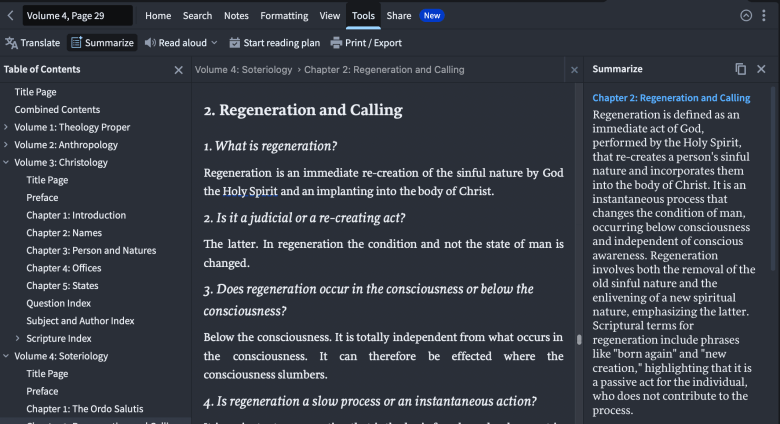
Summarize helps you determine if you should spend time reading a resource for your sermon or not. Perhaps you are studying the doctrine of regeneration, and you have a few systematic theologies opened up on your screen. You don’t have as much time as you wish you had, so you need both some quick summaries (maybe for a one-on-one Bible study) or many it’s to see who you should spend time actually reading. On the Toolbar you can click Tools and then Summarize. Here you can see a bit how how Logos summarizes what Gerhard’s Voz had to say about regeneration. It’s pretty good, so you’ll want to read the whole thing!
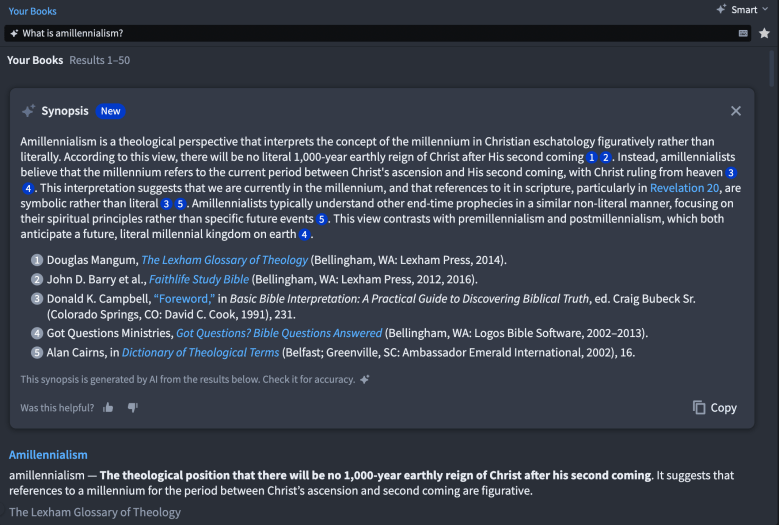
The Search option has been overhauled. Now it can also function to be more akin to Google. In the picture below I typed in “What is amillennialism?” A brief Synopsis of amillennialism comes up first (when the “smart” search is turned on, otherwise I would get a “precise” search from what I have in my books). This synopsis is collated by AI from the books I own. Five books are then suggested before Logos points me to the occurrences in the books I own.
You can even get a summary from each of your search results.

The Sermon Assistant has been heavily updated. Again, Logos won’t write your sermon for you (thankfully). Too many students use ChatGPT to write their papers, and pastors can certainly face the temptation to use it to write their sermons as well in the busy weeks. However, Faithlife makes use of the benefits of AI so that you can use it to your advantage.
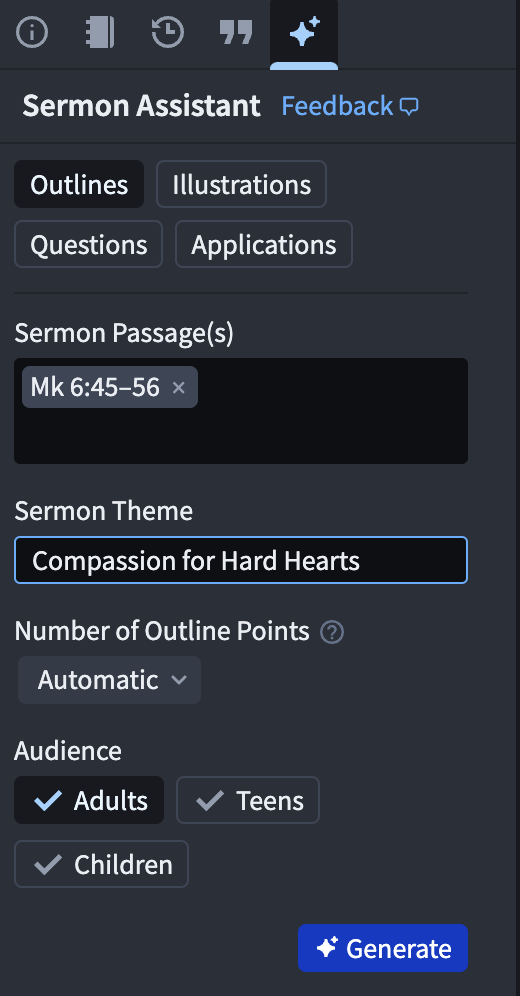
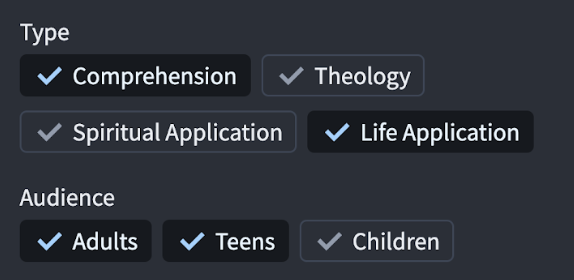
Using these options, Logos can help you develop sermon illustrations, outlines, application, and discussion questions for different audiences.
Just from my own use of ChatGPT, AI can quickly come up with long answers. But a pastor or teacher needs to study to know whether the content is accurate or not. Ai can give a helpful outline, but is it good? That is for the pastor to decide and, to his advantage, tweak.
Do I have to have a subscription to use Logos?
No. With whatever version you currently have and use, you will still continue to receive free app updates and free bug fixes. That said, you won’t get access to the new and improved features offered in the subscription version.
But, what about the books?
If you subscribe, buy books, and then unsubscribe. Guess what? You get to keep your books. If you buy a book, a collection, or a Logos library, they are yours forever. (To purchase the latest libraries you will need to subscribe to Logos, however, the Legacy Libraries will be available to everyone.)
Other Benefits?
- 5% off books storewide
- A bonus free book every month
- 5% annual reward coupon (Pro & Max)
- Uncover search results in your print books—a few sentences will show up from books you own that you have scanned into the Logos app with your phone. You can then pick that book up and go straight to that page.
Which Subscription Should You Choose?
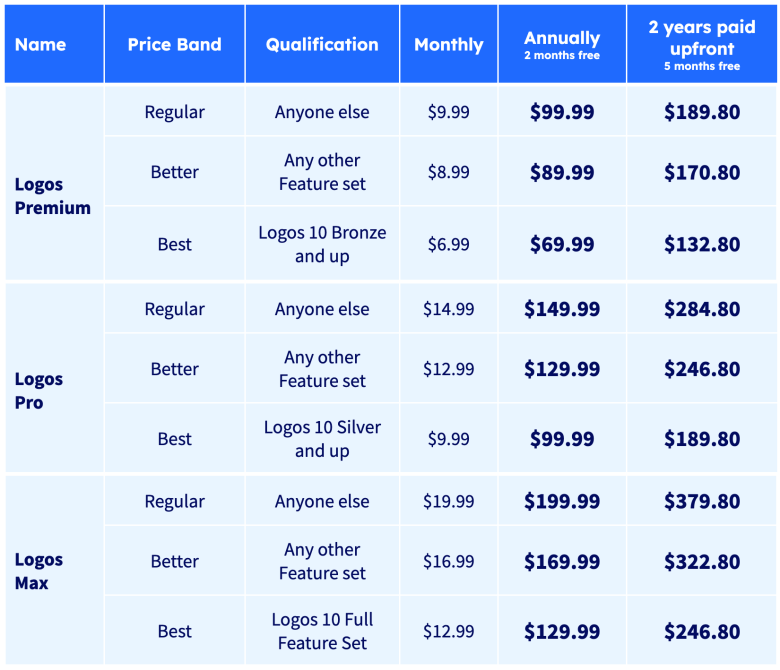
Logos has three subscription options:
- Premium: for small group leaders or for personal study;
- Pro: for pastors and Bible teachers;
- Max: for pastors and academics who work with the original languages and who do more in-depth research.
Recommended?
If you are still trying to figure out if Logos is worth a try, take a look at my reviews of Logos 8 and Logos 9. You will learn about many more features included in the Logos software from them. If you study the Bible or prepare sermons and Bible lessons, Logos is a must have. If you are still in doubt about a subscription, you can still download and use Logos. Watch some more videos and read some more reviews.
Or, perhaps you could try for yourself a free 30-day trial and see how much you enjoy Logos. If so, you can use my link here for that.
Review Disclosure: I received this update free from Faithlife. The opinions I have expressed are my own, and I was not required to write a positive review. I am disclosing this in accordance with the Federal Trade Commission’s 16 CFR, Part 255 http://www.access.gpo.gov/nara/cfr/waisidx_03/16cfr255_03.html.
 spoiledmilks
Hi Spencer! I forwarded this article to my husband, Andy, because he is a major logos fan too. Thank you for the in-depth article! 🙂
LikeLiked by 1 person
Super! I hope he likes it. Thank you!
LikeLiked by 1 person
Thank you for the review. Still happy with your subscription?
Thanks, David
LikeLike
Yes 🙂
LikeLike